Practical AI for Storage Teams (Hold the Hype)
About Core6™
StorageGuard - by Core6 - is the ONLY Security Posture Management solution for Storage & Backup systems, helping to ensure these systems are secure and compliant.
Three places where AI actually helps you secure storage and backup – and the one part nobody puts on the slide.
If you run storage or backup, you’ve been pitched “AI” more times this year than you can count. And most of it is exhausting. Every product suddenly has an AI feature. Every vendor deck has “The Slide”! And almost none of it survives the only question that actually matters to you:
What does this do for me on a Monday, when I’m three tickets deep and something’s misconfigured?
So let’s not do that. This isn’t a post about AI changing everything or coming for your job. It’s a straight look at three specific, fairly unglamorous places where AI is genuinely making the security of storage and backup work less painful right now – plus one thing most AI pitches conveniently leave off the slide.
First, what problem are we actually solving?
It’s worth being clear about why this matters for storage specifically, because it’s a bit different from the rest of your IT stack.
Enterprise storage and backup security has a knowledge problem. Every array, every backup appliance, every management console has its own settings, its own hardening guidance, its own advisories, its own special place where it hides whatever’s misconfigured.
Nobody holds all of that in their head – not across a multi-vendor storage environment, nobody. The knowledge is fragmented across vendors, buried in documentation, and there’s never enough of it to go around.
That’s a big reason these systems drift and stay drifted. Not because anyone stopped caring, but because checking them properly is slow, fiddly, specialist work, and there’s always something more on fire.
And that, as it happens, is exactly the kind of thing language models are good at. Not because they’re magic. Because the job is really about reading, connecting, and explaining a mountain of technical detail faster than a person can. All three of the use cases below come back to that one idea.
1. Just ask it: natural-language investigations
The first place AI earns its keep is answering the questions that’d otherwise eat your afternoon.
Picture what checking a security posture question looks like today. You want to know which of your backup systems don’t have immutability set up properly. So you log into one console, then another, then another (assuming you remember where each vendor buried that particular setting ), and you piece the answer together by hand. It’s slow, it’s easy to get wrong, and the whole thing hinges on you knowing exactly where to look on every platform you own.
Natural-language investigation just… skips all that. You ask in plain English — “show me every backup repository where immutability is off or misconfigured”, and you get an answer from across the whole estate. No memorizing each vendor’s menu tree.
Same deal for “which systems are on end-of-support firmware,” or “where are default credentials still sitting,” or “what changed in my storage config this week?”
The shift is quiet but genuinely useful: the platform expertise moves from you to the tool. You don’t have to be an expert in all sixty systems to interrogate them. You just have to know what to ask, which is the part you’re already good at.
When you’re covering more systems than any team should reasonably cover, that’s the difference between checking a thing now and adding it to the list you both know you’ll never get to.
2. Okay, it’s broken. Now what? AI-assisted hardening analysis
Finding the security misconfiguration is a win. But a finding on its own doesn’t fix anything, and working out what to actually do about it is usually the annoying part. That’s where AI helps next.
A raw list of findings isn’t worth much on its own. Anyone who’s run a vulnerability scanner knows the special despair of getting back 4,000 risks with zero sense of which five matter today!
The useful questions are the ones that need judgment: Is this exposure actually dangerous in my environment, or just technically true? What’s the real fix? Will fixing it break something else at 2am? What do I do first?
This is where AI-assisted analysis changes the day. Instead of just flagging that a setting is off-baseline, it can tell you why that gap matters, what risk it creates, and how to fix it — pointing at the specific storage or backup vendor’s best practice, not a generic checklist.
Take a finding like “time service not hardened on this backup appliance.” It can explain that this could let an attacker mess with retention so your backups quietly age out early, and then hand you the exact step to fix it on that platform.
And it can prioritize, which is the big one. Instead of an undifferentiated wall of findings, it can reason about which exposures actually carry risk given how your environment is set up, so your limited hours go to the handful of things most likely to bite you, not the busywork.
When you’re always outnumbered by the systems you’re responsible for, that triage is where a lot of the real value lives.
3. Help me do the thing: AI-powered administration
The third one’s the most hands-on, and the one to be a little careful with.
Beyond finding and analyzing, AI can help you actually do the work: draft the remediation steps, generate the config change, build the runbook, produce the evidence your auditor keeps asking for. All that tedious connective tissue that eats hours without needing much deep thought – a lot of it can be handed off.
Ask for the exact commands to harden a specific setting on a specific box, and get them, formatted right, without reading through a 200-page PDF !
Done well, this shrinks the distance between knowing what to fix and it being fixed. And that gap – between “found the problem” and “problem’s gone” – is where a ton of exposure time hides.
How many issues have you spotted that then just sat in a queue because nobody had a spare hour to work through the fix by hand? Closing that gap faster is, honestly, most of the game.
But this is also the one that needs the most discipline. Which brings us to the bit the pitches skip.
The bit nobody puts on the slide: AI is a privileged operator
Here’s the part to be clear-eyed about. The second AI can read your storage config, analyze your posture, or make changes, it becomes a very privileged thing in your environment – broad visibility, and maybe the power to act.
That’s exactly the kind of access attackers break their backs trying to get. Hand it to a tool without proper controls and you haven’t removed risk, you’ve just moved it somewhere else.
So the rule is refreshingly boring: treat AI like any other privileged operator, because that’s what it is. It gets a real identity, not some shared anonymous login. Clear ownership, so someone’s accountable for it. Least privilege – it can see and touch what its job needs, and nothing else. And everything it does gets logged, so if you need to know later exactly what it looked at and what it changed, you can.
None of that is a reason to avoid AI. It’s the thing that makes using it safe. The storage teams that get real value out of AI here – without accidentally opening a new door – are the ones who treat “AI can do this” and “AI should do this unsupervised” as two very different sentences.
Keep a human in the loop for anything that matters, and hold the AI to the same access discipline you’d hold any powerful account.
And let’s be honest about the specific thing that makes storage teams nervous: the idea of an AI autonomously making changes on a production array. That’s a genuinely scary thought, and you’re right to feel it.
One bad automated change to zoning, masking, or a retention policy doesn’t just create a ticket, it can take an application down or put data at risk.
“Trust me, the AI’s got it” isn’t a sentence anyone should have to accept on a system that matters this much.
Which is why validation before execution isn’t a nice-to-have. It’s the whole ballgame.
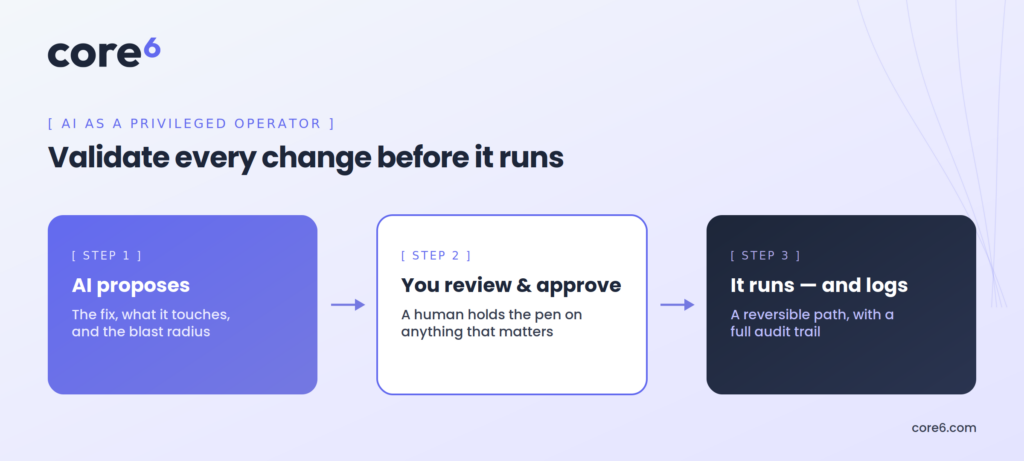
The useful pattern is AI that does the hard analytical work and proposes a change, but shows you exactly what it wants to do before anything happens: what the change is, why, which systems it touches, and what the blast radius looks like if it’s wrong. You review it. You approve it. Then it runs – ideally with a checked, reversible path rather than a one-way door.
The AI drafts; a human signs off; the action is logged. You get the speed of not having to work out the fix by hand, without surrendering the judgment call about whether to actually pull the trigger.
Full autonomy, where the AI detects, decides, and executes on its own, is something you earn gradually – on low-risk, well-understood changes, once the tool has proven itself and the guardrails are solid – not something you switch on across your whole estate on day one.
Anyone pushing hands-off automation of destructive operations on production storage from the jump hasn’t run storage a day in their life.
Start with AI that recommends and validates, keep the human holding the pen, and expand the autonomy only as far and as fast as you’re actually comfortable.
So where does that leave you?
Honestly? AI isn’t transforming storage operations overnight, and anyone who says otherwise is selling you something. What it is doing is quieter and more useful than that.
It’s taking the slow, specialist, scattered knowledge work that made storage and backup security so hard to keep up with, and making it faster and easier to reach. Ask your posture questions in plain English. Turn a pile of raw findings into a short, explained, prioritized to-do list. Get help actually carrying out the fixes. And do all of it across a multi-vendor estate no single human could ever hold in their head.
That’s the thinking behind how StorageGuard uses AI. It points these capabilities squarely at the security of enterprise storage and backup systems, letting you investigate posture in plain language, turning drift and exposures into prioritized, explained fixes instead of a wall of alerts, and doing it with the auditability and least-privilege controls that treating AI as a privileged operator actually requires.
It’s not there to replace your judgment. It’s there to give that judgment a lot more leverage over a storage and backup environment that got too big and too varied to secure by hand a long time ago.
In the end, practical AI isn’t about the tech being impressive. It’s about your Monday being less painful, and your storage environment being more secure at the end of the day than it was at the start. That’s a low bar for a marketing slide and a high one for real work.
The good news: in these specific, unglamorous corners, real work is finally starting to clear it.
Want to know where you actually stand?
Reading through five domains is one thing; knowing how your own estate scores against them is another. That’s exactly why we built the Enterprise Storage & Backup Security Self-Assessment.
It walks you through these same five domains and gives you back a weighted scorecard that surfaces your gaps and shows you which controls to fix first.
Take the Enterprise Storage & Backup Security Self-Assessment
Frequently Asked Questions (FAQs)
How can AI help infrastructure teams secure storage and backup systems?
AI helps infrastructure teams by taking on the slow, specialized knowledge work that makes storage and backup security hard to keep up with. It enables natural-language investigation of security posture, so teams can ask plain-English questions like “which backup systems don’t have immutability configured” instead of manually checking each vendor console. It provides AI-assisted hardening analysis that explains why a misconfiguration matters and how to fix it, and prioritizes findings by real-world risk. And it can assist with administration by drafting remediation steps and configuration changes. The core benefit is speed and accessibility across a multi-vendor estate that no single person could fully master.
What are natural-language security investigations?
Natural-language security investigations let infrastructure teams query their storage and backup environment using plain English rather than logging into multiple consoles and knowing each platform’s specific settings. For example, instead of manually checking every backup appliance for immutability configuration, a team member can ask “show me every repository where immutability is off or misconfigured” and receive an answer drawn from across the whole estate. This moves the platform-specific expertise from the person to the tool, so teams can interrogate their environment without being a specialist in every vendor’s terminology and menu structure — making it far faster to check posture on demand.
Is it safe to let AI make changes to storage and backup infrastructure?
It can be safe, but only with the right controls, because AI that can read configurations, analyze posture, or execute changes becomes a highly privileged actor in the environment — exactly the kind of access attackers seek. The practical approach is to govern AI as a privileged operator: give it a real, non-shared identity; establish clear ownership and accountability; enforce least-privilege access so it can only do what its role requires; and ensure every action is auditable. Just as important is validation before execution: rather than letting AI autonomously change a production array, the safer pattern is for AI to propose a change and show exactly what it will do, which systems it affects, and the potential impact — then have a human review and approve it before anything runs, ideally through a reversible path. Full autonomy is earned gradually on low-risk changes, not switched on across the estate from day one. Treating “AI can do this” and “AI should do this unsupervised” as different questions is what allows teams to gain the efficiency benefits without creating a new attack surface.
Will AI replace storage and infrastructure administrators?
No. AI is not transforming storage operations overnight or replacing infrastructure teams. Its practical value is in augmenting them — taking on fragmented, time-consuming knowledge work like reading vendor documentation, correlating configuration details across platforms, explaining findings, and drafting remediation steps. The judgment about what matters in a specific environment, what to prioritize, and what changes are safe to make still rests with the infrastructure team. AI gives that judgment better leverage over an estate that has grown too large and varied to secure manually; it does not substitute for it.
How does StorageGuard use AI for storage and backup operations?
StorageGuard applies AI specifically to storage and backup security operations. It lets teams investigate their security posture in natural language, turns detected configuration drift and exposures into prioritized, clearly explained remediation guidance rather than an undifferentiated list of findings, and does so with the auditability and least-privilege controls appropriate for treating AI as a privileged operator. Rather than replacing the infrastructure team’s judgment, StorageGuard is designed to give that judgment better leverage across a large, multi-vendor estate — helping teams secure and operate storage and backup systems faster than they could by manual, console-by-console work.
Talk To An Expert
Ensure your storage & backup systems are hardened and compliant.