How StorageGuard Helps Financial Institutions Meet DORA Requirements for Storage and Backup Systems
About Core6™
StorageGuard - by Core6 - is the ONLY Security Posture Management solution for Storage & Backup systems, helping to ensure these systems are secure and compliant.
The Digital Operational Resilience Act (DORA) sets clear expectations for financial institutions: ICT risks must be identified, managed, monitored, and continuously reduced. Storage and backup systems are explicitly in scope – they store regulated data, support critical services, and are central to recovery from cyber incidents.
DORA does not prescribe specific technologies. Instead, it requires institutions to demonstrate that appropriate processes exist and that technical controls are actually implemented and effective over time.
DORA processes and how StorageGuard helps StorageGuard was designed to provide continuous control verification for enterprise storage and backup environments, making it a strong enabler of DORA compliance.
This article will:
- Explain how StorageGuard supports the ICT risk management processes required by DORA
- Provide concrete, real-world examples mapping DORA RTS requirements to StorageGuard checks
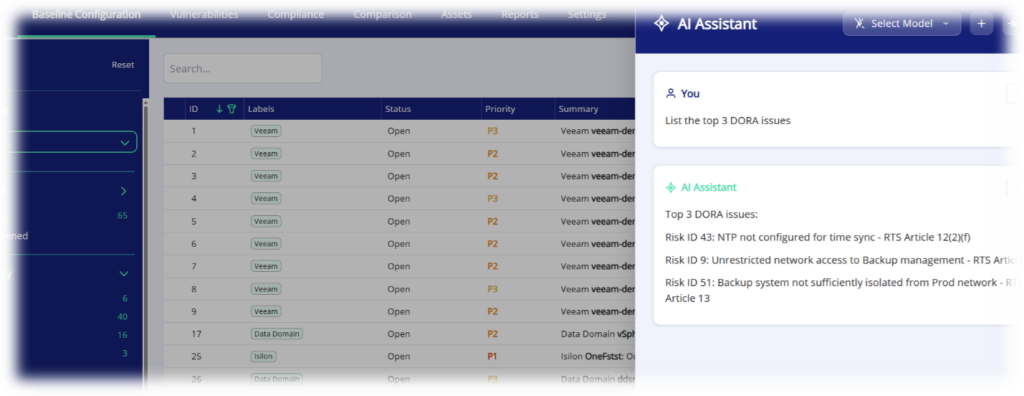
- Simplify adherence, investigation and DORA technical standards reporting with StorageGuard AI
How StorageGuard Supports DORA ICT Risk Management Processes
DORA is fundamentally process-driven. Regulators expect financial entities to show that ICT risks are managed end-to-end—not just documented in policies.
DORA requires financial institutions to know what ICT assets they operate, understand and assess the risks affecting those assets, define and enforce secure configuration baselines, keep systems properly maintained and supported, control access and changes, protect data and backups against loss or tampering, and continuously monitor ICT systems to detect weaknesses and emerging threats.
StorageGuard supports these requirements for storage and backup environments by continuously discovering assets, assessing configuration and security posture, validating secure baselines and hardening settings, highlighting outdated or unsupported platforms, verifying encryption and access controls, detecting configuration drift and risky changes, and producing ongoing, audit-ready evidence that controls are in place and effective over time.
The table below summarizes how StorageGuard supports key DORA-required processes for storage and backup systems.
| DORA requirement (source) | StorageGuard Capabilities |
| Define secure configuration baselines RTS Article 11 “identification of secure configuration baseline for ICT assets that will minimise their exposure to cyber threats and measures to verify regularly that these baselines are those that are effectively deployed… baseline shall take into account leading practices and appropriate techniques…“ “implementation of vendor recommended settings “ RTS Article 13(k) “the implementation of a secure configuration baseline of all network components and hardening the network and network devices according to vendor instructions” Article 16 “continuously monitor the security and functioning of all ICT systems… minimise the impact of ICT risk through resilient and updated systems protocols and tools” Article 8 “on a continuous basis… identify all sources of ICT” | StorageGuard provides a solution for secure configuration baselines for Storage and Backup systems: – Continuously updated library of secure configuration checks based on industry standards and vendor guidelines – Provides out-of-the-box tunable secure configuration baselines – Verifies regularly baselines are implemented using a purpose-built scanner and detection engine – Generate findings for baseline violations (drifts) including evidence, remediation guidance and best practice detail – Agentless scanner capable of gathering storage and backup appliance configurations |
| Vulnerability Scanning and Assessment Article 8 “on a continuous basis …assess cyber threats and ICT vulnerabilities…” Article 13 “Gather information on vulnerabilities… analyse the impact they are likely to have” RTS 2 (60, 62, 63) “Regular automated vulnerability scanning and assessments, typically using specialized software tools, of ICT assets are required… at least on a weekly basis for those ICT assets supporting critical or important functions “ “prioritize patch deployment based on vulnerability criticality and risk profiles, while monitoring and verifying remediation “ “record detected vulnerabilities, evaluate software and hardware patches and updates” RTS Article 31 “continuously monitor …vulnerabilities relevant to their critical or important functions” | – Continuously updated knowledgebase of security advisories, bulletins, alerts and CVEs – Identification of storage and backup systems exposed to said vulnerabilities – Risk-based vulnerability prioritization through severity and exploitability detail – Agentless scanner capable of gathering storage and backup appliance settings, firmware and patching – unlike any other vulnerability scanner |
| Assess risk after major changes Article 8 “perform a risk assessment upon each major change in the network and information system infrastructure” RTS Article 31 (e) “identification and assessment of any ICT and information security risks resulting from any major change in ICT system or ICT services, processes or procedures, as well as from ICT security testing results and after any major ICT-related incident.” | – StorageGuard automatically identifies security risks for Storage and Backup systems by reviewing their current configuration. – StorageGuard scan can be scheduled to run regularly or can be executed on demand after significant changes |
| Identify ICT assets and Map Configurations Article 8 (2, 6) “identify all ICT assets… hardware equipment… map the configuration of the ICT assets” “maintain relevant inventories and update them periodically and every time any major change” | – StorageGuard discovers and maintains an inventory of Storage and Backup systems – hardware and software – StorageGuard gathers detailed configuration map for each scanned Storage and Backup systems including OS version, firmware, patches, security settings, system settings and more. |
| Article 6 “minimise the impact of ICT risk by deploying tools” | – StorageGuard is the leading solution for minimizing ICT risk across Storage and Backup systems, with its purpose-built scanner and continuously updated knowledgebase of storage and backup security best practices, vendor hardening guidelines and vulnerabilities. |
StorageGuard Checks for DORA Regulatory Technical Standards (RTS)
DORA and even more so DORA RTS translates regulatory intent into verifiable technical expectations. StorageGuard addresses these expectations by checking real configurations in storage and backup systems.
The examples below are illustrative, not exhaustive. StorageGuard covers hundreds of additional checks aligned with DORA and its RTS, as well as other regulations, industry standards and cybersecurity frameworks.
DORA RTS mappings to StorageGuard controls
| DORA requirement (quote & article) | Examples: Mapped StorageGuard Checks |
| RTS Article 12(2)(f) “Synchronisation of the clocks of each ICT system upon a documented reliable reference time source” | – NTP server configuration – Approved NTP servers – NTP server redundancy – Secure NTP status – And more. |
| RTS Article 13(1)(l) “Limit, lock and terminate system and remote sessions after a predefined period of inactivity” | – Idle session timeout (GUI) – Idle session timeout (CLI) – Absolute session timeout – Inactive NFS session timeout – Remote support session timeout – And more. |
| RTS Article 21 “access rights to ICT assets based on need-to-know, need-to-use and least privilege principles … Provision on restrictions of access to ICT assets” “Assignment of access rights must be “based on need-to-know, need-to-use and least privilege principles, including for remote and emergency access.” “Provision on user accountability, by limiting to the extent possible the use of generic and shared user accounts and ensuring that users are identifiable for the actions performed.” Regulation Article 9(4)(c) Limit… logical access to … ICT assets to what is required for legitimate and approved functions and activities only, and establish … controls that address access rights and ensure a sound administration” | – Strict Management IP ACLs – Concurrent session limits – Approved Users / Groups – IP Filter – CHAP authentication – MFA – Account Lockout – Password Rules – RBAC and group mapping – File share access rights – Central authentication – Non-default local users – Default Passwords – Inactive user accounts – Default SAN Zone – File share allowed clients – Identity provider configuration – NFS root squash – Default users – And more. |
| RTS Article 10 (4) “identify and evaluate available software and hardware patches and updates using automated tools.. set deadlines for the installation of software and hardware patches and updates” | – Platform currency checks, including: – OS and firmware versions – Approved platform versions – End-of-support and end-of-security-updates detection – Exposure to security advisories – Vulnerabilities – And more. |
| Article 9(2) “maintain high standards of … confidentiality of data, whether at rest, in use or in transit.” RTS Article 6 “policy on encryption and cryptographic controls… rules for the encryption of data at rest and in transit … for the encryption of internal network connections … cryptographic key management establishing the correct use, protection and lifecycle of cryptographic keys” RTS Article 7 “implement controls to protect cryptographic keys“ | – Data-at-rest encryption – Backup data encryption – Encryption strength – Disk Drive encryption (SED) – Data-in-transit encryption – TLS version and cipher strength – KMS / KMIP configuration – Secure LDAP – Cleartext protocols are disabled – Pool encryption – Certificate best practices – Hash algorithm strength – Replication encryption – Node communication encryption – Volume encryption – SMB / NFS / S3 data in transit encryption – And more. |
| RTS Article 13(1)(a) “the segregation and segmentation of ICT systems and networks… the use of a separate and dedicated network for the administration of ICT assets” | – Data and management network separation – Backup domain separation – Backup user access separation – Restricted management access – No user access on replication interfaces – And more. |
| RTS Article 12 “identification of the events to be logged, the retention period of the logs and the measures to secure and handle the log data… alignment of the level of detail of the logs … Measures to protect logging systems and log information against tampering, deletion and unauthorised access at rest, in transit and, where relevant, in use.” | – Log forwarding – Audit logging enabled – Syslog server configuration – Event types being logged – Event types being forwarded – Log forwarding security – Log retention – Log forward protocol – Authorized syslog server |
| Article 12 “The activation of backup systems shall not jeopardise the security of the network and information systems or the availability, authenticity, integrity or confidentiality of data.” “When restoring backup… financial entities shall use ICT systems that are physically and logically segregated from the source ICT system. The ICT systems shall be securely protected from any unauthorized access or ICT corruption” RTS article 8 controls and monitoring of ICT systems, including all of the following: (i) backup and restoration requirements of ICT systems; Article 26 ensure the availability, integrity, continuity and recovery of at least ICT systems and services supporting critical or important functions of the financial entities | – Encrypted backups – Immutable backup – Protected storage snapshots – Data copy retention period – Retention-lock enforcement mode – Backup network separation – Backup user access separation – Multi person authorization – Backup management ACL – Backup Integrity validation enabled – Backup malware scan enabled – Backup anomaly detection enabled – Backup data in-transit encryption – Backup infrastructure communication encryption – Backup appliance vulnerability identification – Backup appliance firmware and software end of support – And more. |
This represents only a subset of StorageGuard’s coverage, which spans hundreds of checks aligned to DORA and its RTS.
Using StorageGuard MCP and AI to Accelerate, Maintain and Prove DORA Compliance
DORA compliance is not only about implementing controls, but also about preparing, validating, and demonstrating evidence across teams such as IT, security, risk, and audit. This is often where organizations struggle—especially in complex storage and backup environments.
The StorageGuard MCP* (Model Context Protocol) server enables secure integration between StorageGuard and AI-based assistants, allowing users to interact with StorageGuard findings using natural language while remaining grounded in authoritative, real configuration data.
With MCP-enabled AI access, teams can:
- Prepare for DORA assessments more efficiently
Ask questions such as “Which storage systems are not aligned with our secure configuration baseline?” or “Where do we have encryption gaps in backups?” and receive answers backed by StorageGuard’s continuously collected evidence.
- Validate compliance against DORA expectations
Quickly review whether key DORA processes—such as asset coverage, access controls, encryption, logging, or recovery protections—are consistently enforced across the environment.
- Produce audit-ready explanations and evidence
Translate technical findings into clear, structured explanations suitable for risk teams, internal audit, or regulators, without manually assembling data from multiple tools.
- Reduce dependency on individual expertise
MCP allows institutional knowledge to be embedded into the platform, helping teams respond consistently even as personnel or responsibilities change.
Summary
DORA compliance is not achieved through documentation alone. Financial institutions must demonstrate that ICT risks are continuously identified, controlled, and reduced in practice.
StorageGuard helps organizations do exactly that by:
- Providing continuous visibility into storage and backup ICT assets
- Enforcing secure configuration baselines
- Detecting vulnerabilities, drift, weaknesses and risky changes
- Producing audit-ready evidence aligned with DORA requirements
By embedding StorageGuard into the ICT risk management framework, organizations move from periodic compliance exercises to continuous ICT risk management for Storage and Backup platforms – mission-critical ICT data assets.
* The StorageGuard MCP Server is included in the ‘Enterprise+AI edition’ of StorageGuard, and currently under limited availability.
To see how StorageGuard can help with audit readiness, go to:
https://www.core6.com/storageguard-for-compliance-audit-readiness/
Talk To An Expert
Ensure your storage & backup systems are hardened and compliant.