What’s New in StorageGuard
About Core6™
StorageGuard - by Core6 - is the ONLY Security Posture Management solution for Storage & Backup systems, helping to ensure these systems are secure and compliant.
AI-Assisted Hardening, Change Control, and More
Storage and backup systems are the last line of defense against ransomware, and keeping them hardened is getting harder. Configurations drift, vendors publish advisories faster than teams can respond, and AI is accelerating how quickly new vulnerabilities surface in the protocols these systems are built on.
In our recent What’s New in StorageGuard webinar, Yaniv Valik (VP of Product) and Ronen Tsaban (Lead StorageGuard Developer) walked through the capabilities we’ve added in StorageGuard v10.1 – many of them powered by StorageGuard’s new AI capabilities. Here’s a recap.
First, a quick refresher: what StorageGuard does
| StorageGuard is the security posture management solution purpose-built for enterprise storage and backup. It proactively hardens your environment by identifying configuration risks and drift, and helping you remediate them across four core use cases: security hardening, configuration baselines and drift detection, audit and compliance (NIST, CIS, DORA, NERC CIP, HIPAA, FFIEC and more), and vulnerability and patch exposure. |
What’s new in Release 10.1
Change Control: a configuration time machine for storage & backup
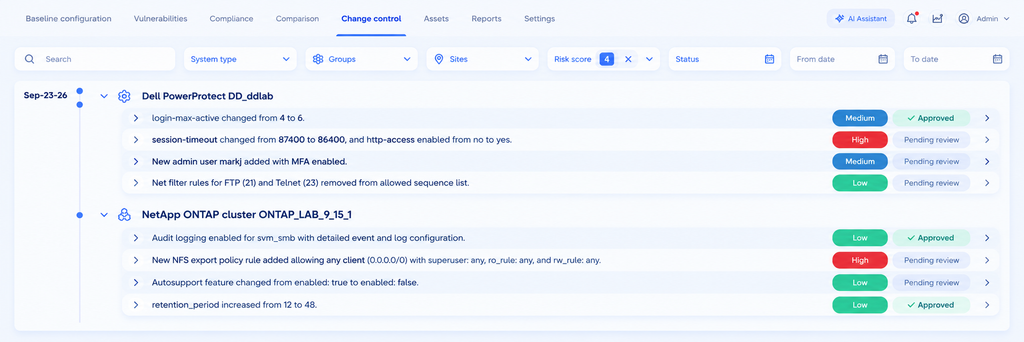
Release 10.1 introduces a dedicated Change Control area that tracks configuration changes across your estate over time. You can see a full change timeline, compare any system against a past point in time to see exactly what changed, and view recent changes alongside findings – so when an issue appears, you can understand what happened right before it.
Each change event carries an AI-powered change risk score, and a dashboard surfaces stability scores, change rates, and other metrics by site, technology, and risk. You can also mark changes as authorized or unauthorized to keep control of your baseline.
Build custom checks just by describing them
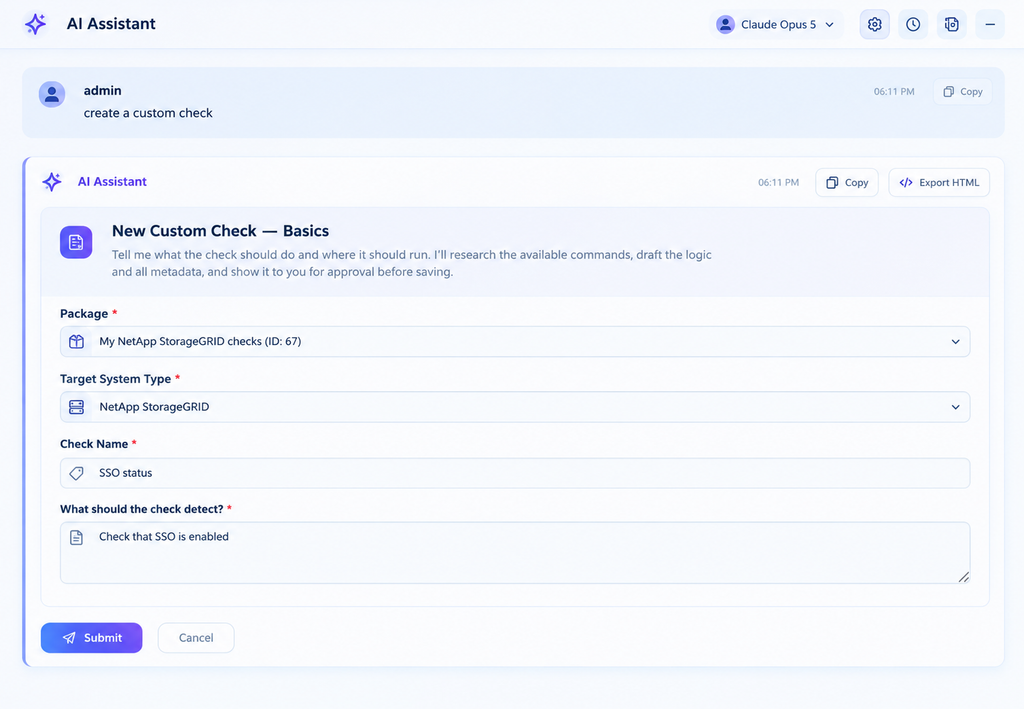
Storage teams often have their own requirements they need to verify across the environment. With the new AI-assisted check builder, you simply describe what you want to validate in plain language. StorageGuard then writes the detection logic and finding metadata for you.
It works for any system you run. You describe the check, review and tune what StorageGuard proposes, then save it to a package. Once enabled, it runs as part of standard risk analysis alongside the built-in checks, and becomes part of your baseline policies.
More ways to work with the AI assistant
Beyond building checks, the AI assistant supports everyday hardening and security workflows with a near-zero learning curve. You can query configurations across every scanned system, investigate the context behind each finding, ask compliance questions against your standards, and explore hardening opportunities asset by asset.
Asset Hardening Planner: from findings to a fix plan
Finding issues is only the beginning. You also need a practical way to address them. The new Hardening Planner turns findings into a prioritized, step-by-step remediation plan, delivered as CLI or REST API commands.
Choose an asset and the findings to include, and StorageGuard generates a phased plan: quick, non-disruptive fixes first, with more complex or disruptive changes grouped for a maintenance window. You can scope it to baseline config issues, vulnerabilities, or both, and filter by severity.
Fix-It: automated drift remediation
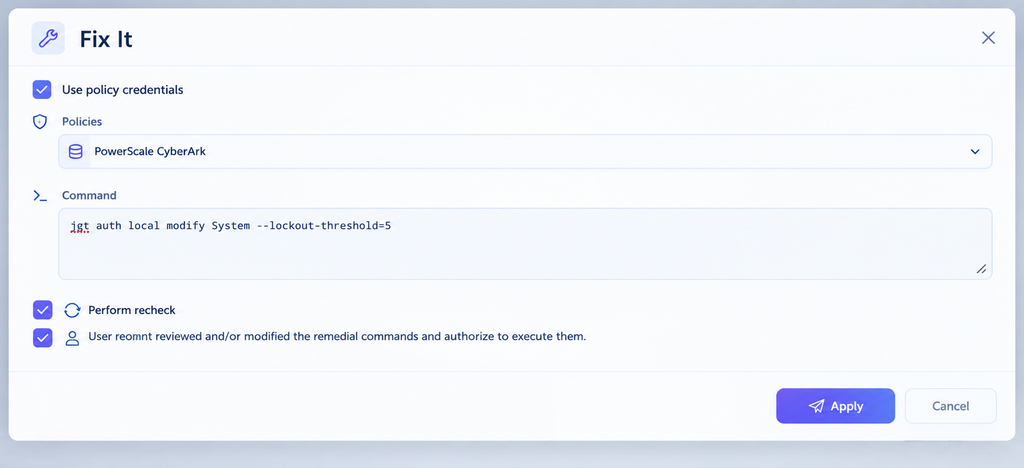
For many misconfigurations and baseline violations, you can now trigger remediation directly from the finding. Review the finding and suggested fix, click the Fix-It icon, and complete the workflow to apply the change. No separate tooling required.
Stronger ransomware resilience checks
Storage and backup systems offer a range of ransomware protection capabilities: immutable copies, multi-person authorization, file activity monitoring, anomaly detection, alerting, control plane hardening, and more. But their effectiveness depends on how each is configured. StorageGuard now evaluates how these defenses are set up, checks each capability against vendor best practices, and shows exactly where to tighten settings.
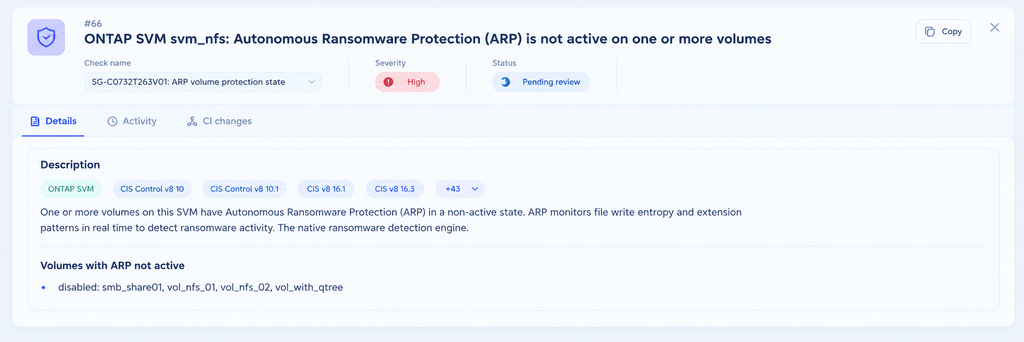
Coming soon
Compensating configuration controls for CVEs
When a new security advisory lands, the urgent questions are: Which systems are affected? What remediation is available? And what can we do while we wait to patch? Today StorageGuard handles advisory analysis and configuration hardening in separate areas. We’re bringing them together.
The goal is to add configuration context to vulnerability response. StorageGuard will highlight mitigating controls already in place, suggest compensating configuration changes that may reduce exposure, and help you reprioritize findings accordingly. For example, de-prioritizing a CVE that several existing controls already offset, in favor of one with no compensating controls in place.
AI-powered reporting
Generate reports directly with AI, an extension of the assistant’s reach across StorageGuard workflows.
StorageGuard SaaS
For organizations pursuing a cloud-first approach, we’re working on a SaaS delivery model. Core6 fully manages the SaaS UI, management services, database, and risk analysis engine, while a lightweight on-premises collector securely gathers configuration data over an outbound-only connection (proxy supported) and manages scan credentials for your local systems. More to come in the months ahead.
Want to see it in action?
Watch the on-demand webinar at https://www.core6.com/resources/webinar-whats-new-in-storageguard-2026/
If you’d like to learn more about any of these capabilities or discuss what they’d mean for your environment, reach out to the Core6 team at https://www.core6.com/talk-to-an-expert/.
Frequently Asked Questions (FAQs)
What is StorageGuard?
StorageGuard is a security posture management solution purpose-built for enterprise storage and backup systems. It proactively hardens your environment by identifying configuration risks and drift, and helps you remediate them across four core use cases: security hardening, configuration baselines and drift detection, audit and compliance, and vulnerability and patch exposure.
What’s in StorageGuard Release 10.1?
Release 10.x introduces a dedicated Change Control area with a configuration change timeline and AI-powered change risk scoring, an AI-assisted custom check builder, more ways to work with the AI assistant, the Asset Hardening Planner, Fix-It automated remediation, and expanded ransomware resilience checks.
How does the AI-assisted custom check builder work?
You describe what you want to validate in plain language, and StorageGuard writes the detection logic and finding metadata for you. It works for any system you run. You review and tune the proposed check, then save it to a package. Once enabled, it runs as part of standard risk analysis alongside the built-in checks and becomes part of your baseline policies.
How does StorageGuard help with ransomware protection?
Storage and backup systems offer a range of ransomware protection capabilities: immutable copies, multi-person authorization, file activity monitoring, anomaly detection, alerting, control plane hardening, and more. But their effectiveness depends on how each is configured. StorageGuard evaluates how these defenses are set up, checks each capability against vendor best practices, and shows where to tighten settings.
Talk To An Expert
Ensure your storage & backup systems are hardened and compliant.