Hardening Is Continuous: Protecting Storage and Backup in the AI Era
About Core6™
StorageGuard - by Core6 - is the ONLY Security Posture Management solution for Storage & Backup systems, helping to ensure these systems are secure and compliant.
Backups were already the first target in a ransomware attack, and AI now lets attackers reach them in hours instead of weeks. A system hardened once and left alone will not stay hardened. This post follows the argument from our recent Dell and Core6 webinar: why the hardened state has to be maintained continuously, and what that looks like in practice.
Backups are already the first target
Before AI enters the picture, the starting point is already uncomfortable. In the research behind our webinar, 94% of ransomware victims saw attackers try to compromise their backups, and 57% of those attempts succeeded. When the attack began with an exploited vulnerability, the success rate rose to 75%.
That 75% is the hardening gap: systems that are outdated, misconfigured or simply not hardened enough. And attackers have more reason than ever to break backups, because 66% of victims now recover from them, up 12 points in a year.
A recent Check Point report describes what this looks like in practice. A Qilin affiliate moved laterally, stayed undetected for five weeks, and ran destructive commands on a backup appliance the day before encrypting. That was last year, and it was not theory. Now think about what happens when AI shrinks five weeks to days, hours or even minutes.
AI compresses every step on the path to storage and backup
Start with the clock. In 2018, the mean time to first exploitation was 63 days after disclosure. In 2026, Mandiant’s M-Trends data shows exploitation starting 7 days before disclosure. The patch window did not shrink, it went negative.
Inside the network, every step on the path to your arrays and backup appliances used to cost a human days or weeks. AI turns each one into hours.
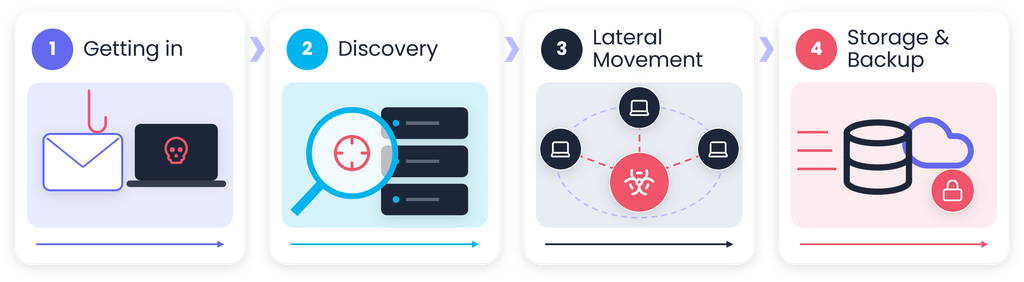
| Stage | Before AI | With AI |
|---|---|---|
| Getting in | Hand-built phishing, one email at a time | Stolen identities, AI-built fake employees and exploited edge flaws. MFA and firewalls get passed |
| Discovery | Days of manual mapping of shares and consoles | Hours: an agent enumerates arrays, nodes and backup servers, and knows which ones matter |
| Lateral movement | Try a path, fail, regroup, try again | Tries every path until one works, and rewrites the malware when it is detected |
| Reaching storage and backup | Months for a specialist to write an appliance exploit | One agent workflow produced 12 zero-day candidates against appliance firmware in a month |
The consequence is simple. An annual hardening review leaves a 365-day window, and an attacker who moves in hours will not wait for it. Patching twice a year or even quarterly does not work any more.
Hardening is a baseline you keep, not a state you reach
If attackers move this fast, protection has to work at three different moments:
- Before the vulnerability is known. Your only protection is how hardened the system already is: unnecessary services off, management plane locked down, immutability on. That is the baseline. Every time a system drifts from it, that is a way in, and those now get found in hours.
- Before patching. The advisory lands and the patch is weeks from production. Which systems are affected, and what can you change today to take the risk down?
- After patching or upgrades. Settings change and exceptions get left behind. That is where regressions hide, so you check the baseline again.
Two things carry you through all three: a hardened baseline that you keep current, and automated advisory analysis that tells you in minutes what is exposed.
Where a baseline comes from
What does “hardened” actually mean for your estate? It comes from four places:
- Your organization: what GRC, security, resilience and operations require.
- Your vendors: their hardening guidance, and what each product can actually do.
- Standards and regulators you answer to.
- Your storage and backup team: product context, architecture, and the role and business criticality of each system.
You turn that into a target baseline per platform, whether it is SAN, NAS, object, backup, cloud or software-defined. Two things make it work. It is verifiable: you can check it on a system and mark it pass or fail, not an opinion. And it is alive: checked continuously, drift remediated, and updated when requirements, guidance or capabilities change. A baseline that sits in a document is not a baseline.
When an advisory lands, the first answer is not the patch
Every new advisory starts the same questions. Are we affected, and which models and versions? Is the vulnerable component even enabled? What controls do we already have, and what could we add? For most teams this is a manual, days-long exercise, and every hour of it is an hour exposed. It should be automated: advisory in, answers out, in minutes.
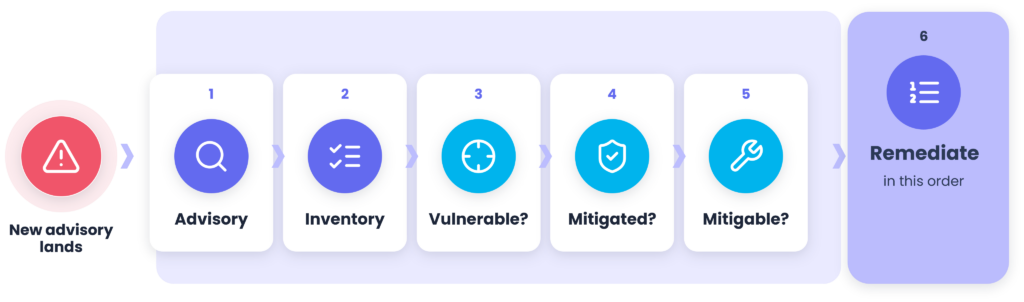
- Advisory: what is impacted, what is the fix, is it being exploited?
- Inventory: which versions and settings are in the estate?
- Vulnerable? Which systems are actually affected?
- Mitigated? Which controls are already in place?
- Mitigable? Which controls could be added today?
- Remediate, in this order.
The order matters because the first answer is usually not the patch. Patching storage and backup can take weeks of testing and change windows, given the uncertainty an upgrade introduces. Configuration changes do not. Is SSHv1 or SMB1 still on? Is HTTP open on a web UI nobody uses? Is the management plane reachable from more than the admins who need it?
Controls like these often block exploitation while the patch is still in test, and because they are known functionality, the change is predictable. So the sequence is: reduce risk now with mitigating configuration, then test and apply the patch when it is ready. Before rushing to patch, ask what you can do today to take the risk down safely.
Two things drift: your systems, and your baseline
Here is what happens after day one. The baseline is approved: privileges restricted, immutability on, unused services off. Then life happens. An exception is made for a migration. A support engineer re-enables a protocol to troubleshoot and forgets. An upgrade resets a setting. New systems are deployed. None of it is malicious, and all of it is drift. By day 100 the system looks nothing like what you approved.
That is the systems problem. The second problem is the baseline itself. By day 200 the world has moved: new advisories, new vendor guidance, new capabilities, new GRC requirements. Each one you have not worked through is another step up, and your baseline has not followed. Even a perfectly compliant system is then compliant with a stale target.
Systems drift from the baseline, and the baseline drifts from the threat. You need a loop for both.
The control loop: four steps that go round
Running both loops comes down to four steps, and the arrow matters because it goes round.
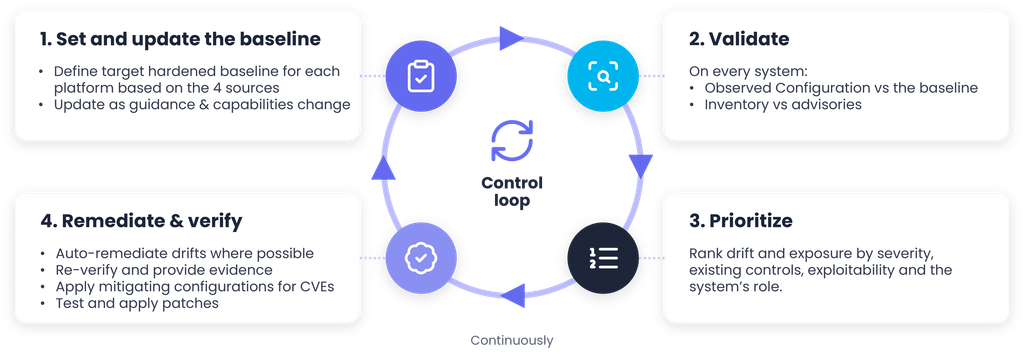
- Set and update the baseline. Define the target per platform from the four sources. When risk, capabilities, guidance or regulation change, the baseline changes with them. Version it, track the changes and give it an owner. It is a lifecycle, not a document.
- Validate. Run two automated, repeatable checks on every system: is its configuration still on the baseline, and does the inventory match anything in the new advisories? Drift and exposure are found in the same pass.
- Prioritize. Not every failed check is equal. Rank by severity, exploitability, the controls already in place and what the system does.
- Remediate and verify. Fix drift automatically where you can, apply mitigating configuration for CVEs, test and apply patches, document the exceptions, and re-check.
Steps two to four run daily, and again after any change or advisory.
Keep the evidence as you go. Auditors will ask for proof of baseline adherence and for the exceptions. Every deviation should have evidence, an owner, a remediation and a re-validation. “We hardened it once” is not evidence of the current state.
What this looks like with Dell and Core6
Dell cyber-resilience capabilities and Core6 posture validation address complementary layers of resilience. Dell brings the platform, data protection and recovery architecture. Core6 adds configuration hardening, baseline validation, drift detection and advisory exposure analysis, with the evidence to prove it.
StorageGuard is what storage teams use to run the loop. It ships with baselines and configuration checks for Dell and non-Dell platforms, and it is updated continuously with security advisories. In the webinar demo, the workflow takes under five minutes: pick a baseline, scan the systems, see where they deviate, and remediate.
The advisory side works the same way. When a new advisory comes out, StorageGuard shows which systems are affected by model and version, whether the vulnerable component is even enabled, how exploitable it is, and which mitigating controls are already in place or could be switched on today. Then you patch, when the patch is ready.
One takeaway
Hardening is continuous, not a project. Establish the baseline, detect drift, prioritize exposure, remediate, and verify again.
To see where your own storage and backup environment stands, take the Storage & Backup Security Maturity Self-Assessment.
Watch the on-demand webinar with Dell at https://www.core6.com/resources/webinar-keeping-storage-and-backup-secure-in-the-ai-era/
Sources
As cited in the webinar slides:
- Sophos, The State of Ransomware, 2024 to 2026
- Check Point, Cyber Security Report 2026
- Google Mandiant, M-Trends 2026 (mean time to exploit)
- Anthropic Threat Intelligence, November 2025 and September 2026
- Unit 42, 2026 Incident Response Report
Frequently Asked Questions (FAQs)
Why do attackers go after backups first?
Because backups are how most victims recover. In the research behind our webinar, 66% of ransomware victims now recover from backups, so breaking them makes an attack far more likely to pay off. 94% of victims saw attackers attempt to compromise their backups, and 57% of those attempts succeeded.
What is a hardened baseline?
It is a selected set of system and security settings that every applicable system should satisfy. It is built from your organization’s requirements, vendor guidance, standards and regulations, and your storage team’s expertise, and it is defined per platform. A useful baseline is verifiable (pass or fail) and kept up to date.
What is configuration drift, and why does it happen?
Drift is when a system’s settings move away from the approved baseline. It comes from ordinary events: exceptions for migrations, a protocol re-enabled for troubleshooting and never switched off, upgrades that reset settings, and new systems added. None of it is malicious, which is why it goes unnoticed without continuous checks.
Should we patch as soon as an advisory lands?
Patching is part of the answer, but it is usually not the first move. Patching storage and backup can take weeks of testing and change windows. Mitigating configuration, such as turning off SSHv1 or SMB1, closing an unused HTTP interface or restricting the management plane, can reduce the risk today while the patch is tested.
How often should hardening be checked?
Continuously. In the control loop we described, validation runs daily and again after any change or advisory. An annual review leaves a 365-day window, and attackers now move in hours.
How does AI change an attacker’s path to storage and backup?
It compresses every step. Discovery that took days of manual mapping now takes hours. Lateral movement becomes automated retrying, and writing an appliance exploit, once months of specialist work, can be accelerated. Our table of attack stages above shows the before and after.
What evidence do auditors expect?
Proof of baseline adherence and of how exceptions are handled. Every deviation should have evidence, an owner, a remediation and a re-validation. A one-time hardening exercise is not evidence of the current state.
Does this only apply to Dell systems?
No. StorageGuard ships with baselines and configuration checks for Dell and non-Dell platforms (e.g. NetApp, Hitachi Vantara, HPE, Everpure, Cohesity, Commvault, Rubrik, IBM, Infinidat, Broadcom (Brocade), VAST Data, etc), and it is updated continuously with security advisories.
Talk To An Expert
Ensure your storage & backup systems are hardened and compliant.